Keeping a Homelab Online with Solar, Powerwalls, and a Generator
I have been thinking about backup power differently since putting together a home energy system: 36 solar panels installed in 2022 and two Tesla Powerwall 3 units. The obvious question is whether that setup can keep a homelab running when the grid goes down.
For a short outage, solar and batteries can be a strong combination. The less obvious problem is duration. A few cloudy days, nighttime loads, or a long utility outage can outlast the energy stored in the batteries. If the goal is to keep critical services available for days, a whole-home backup generator may be the missing layer.
This is a design discussion, not an electrical installation guide. Generator and Powerwall compatibility depends on the specific equipment, transfer-switch arrangement, utility requirements, and local code. Have a qualified electrician and Tesla-certified installer design and approve the final system.
What does “keep the homelab online” mean?
A homelab is not just the server. If any of these go dark, remote access and services may disappear:
- The modem or fiber ONT
- Router and firewall
- Core switch and Wi-Fi access point
- NAS, server, or virtualization host
- DNS, authentication, and monitoring services
- Cooling and ventilation, if the equipment needs it
Start by deciding what actually needs to stay online. Maybe that is the whole rack; maybe it is only the router, a small server, and storage. Measure the real load at the wall, including startup peaks. A plug-in power meter or UPS telemetry is more useful than estimating from the power supplies’ labels.
The three parts of the backup plan
Solar can make new energy during the day, including during an outage when the system is designed for backup operation. It does not guarantee production at night, in heavy clouds, or under conditions that force the system to curtail.
Powerwalls bridge the gap and can recharge from solar while the grid is down. Tesla says a traditional solar system without a battery does not operate during a grid outage; a compatible Powerwall system can keep solar operating and supply the home. Available runtime depends on stored energy, solar production, and the loads being served.
A generator adds fuel-based energy for a longer outage. It can cover sustained household loads when solar production is poor or the batteries need to conserve energy. It is the duration layer, not a replacement for measuring loads or planning what should remain powered.
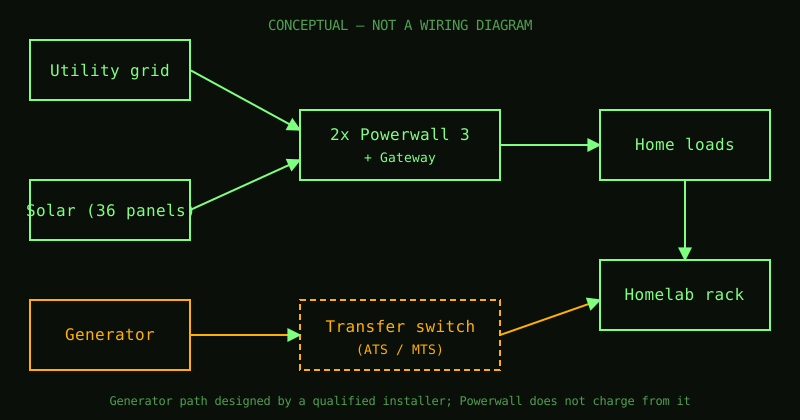
Conceptual only. It does not show a wiring diagram or prescribe where specific equipment must be connected.
The important Powerwall and generator detail
Tesla’s guidance says Powerwall can be used alongside a backup generator connected through an external automatic transfer switch (ATS) or manual transfer switch (MTS). In Tesla’s described arrangement, the Powerwall system is installed between the utility meter and the generator transfer switch. The systems are not directly integrated, and Powerwall does not charge from the generator.
That matters for expectations. A generator may power home loads through the approved transfer arrangement, but do not assume it can recharge the Powerwalls or that any generator can simply be wired into the Tesla system. The exact behavior depends on the equipment and the design. The installer should confirm what stays powered, what transfers, and how the system returns to normal when utility power comes back.
A practical priority stack for the rack
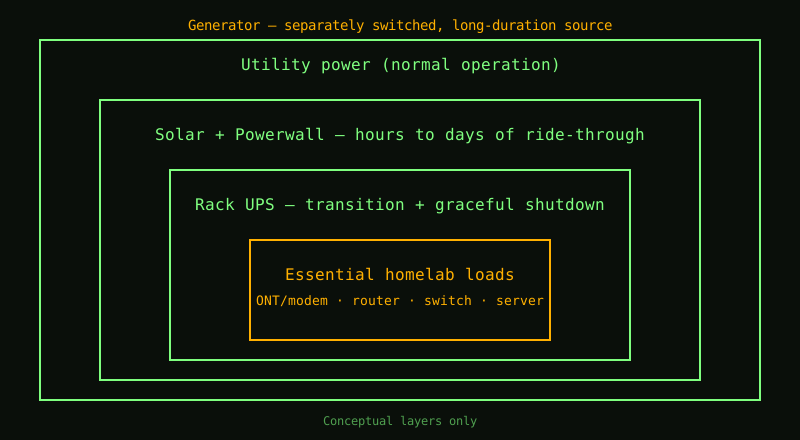
Even with whole-home backup, I would treat the homelab as a critical load with its own orderly shutdown plan:
- Put the modem/ONT, router, core switch, and essential server behind a UPS.
- Configure UPS monitoring so the server can shut down cleanly at a chosen battery threshold.
- Keep nonessential compute, lab switches, and high-draw equipment off the critical backup group if they are not needed.
- Keep a backup of configuration files and recovery notes somewhere outside the rack.
- Test the outage sequence under supervision: transfer, network recovery, UPS signaling, shutdown, and restart.
The UPS handles the brief transition and protects electronics from an abrupt loss. The home battery and solar provide longer ride-through. The generator helps extend that window when the sun and stored energy are not enough.
Plan around energy, not just watts
Power has two separate constraints:
- Power (kW): Can the backup system handle the equipment running at the same time, including startup surges?
- Energy (kWh): How long can the battery support those loads before solar replenishment or generator support is needed?
For example, a small network stack and one efficient server may use far less energy than a rack full of storage, GPUs, and cooling. Write down each device’s measured watts and decide what can be shed first. Then compare the critical load to the usable battery energy and the solar production you can reasonably expect during an outage. Treat cloudy-day production as uncertain, not guaranteed.
A useful exercise is to model three modes:
- Normal: all homelab equipment is available.
- Conservation: nonessential compute and lab devices are off.
- Extended outage: only connectivity, monitoring, and the services needed for recovery remain online.
This gives you a simple load-shedding plan instead of discovering your priorities after the batteries are low.
What I still need to solve
For my own setup, the solar and two Powerwalls give me a substantial starting point, but I still need to close the long-outage gap. A whole-home generator is attractive because it can support more than just the homelab. The hard part is making sure the generator, transfer switch, Powerwall system, solar, and household loads work together safely and predictably.
The right next step is not guessing at a wiring diagram. It is documenting the exact inverter, Gateway, panel, and generator equipment, listing the loads I want backed up, and having an installer design the approved transfer arrangement. Then I can verify the homelab’s real runtime and shutdown behavior in a controlled test.
Reliable uptime is a chain: power generation, storage, transfer, networking, graceful shutdown, and recovery. Solar and Powerwalls make the first part much stronger. A correctly integrated generator can help with the long outages. The small UPS in the rack makes the handoff gentler. None of those layers removes the need to test the whole chain.